Physical Address
304 North Cardinal St.
Dorchester Center, MA 02124
Physical Address
304 North Cardinal St.
Dorchester Center, MA 02124

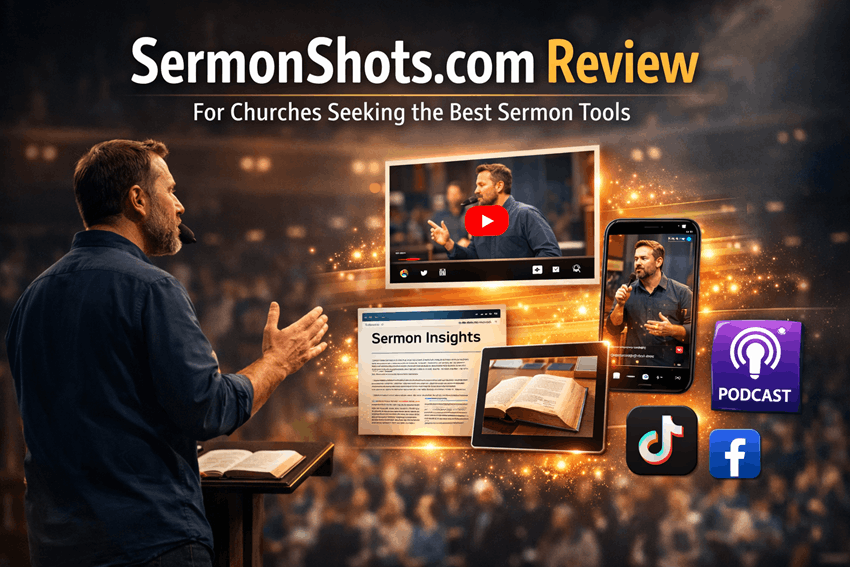
SermonShots.com is designed for one core ministry challenge: turning a faithful Sunday sermon into shareable, usable content that keeps discipling people all week—without requiring a large media staff.
Sermon Shots says it was built after pastors and ministry leaders repeatedly expressed a need for sermon clips—because many churches lacked the time, tools, or budget to repurpose sermons like larger churches with dedicated media teams.
Telling Ministries lists January 2022 as the launch of SermonShots.com, and Sermon Shots notes it welcomed its first paying church by July 2022 and has grown into “a suite trusted by thousands weekly.”
Target users are explicitly churches: pastors, communications staff, and volunteers who need weekly sermon clips and follow‑up content. Sermon Shots also offers an API for automation and integrations, aimed at churches and church software platforms.
Sermon Shots’ value as one of the “best sermon tools” comes from its church-first workflow and its outputs. The list below is verified from Sermon Shots’ official pages and support docs.
| Capability | Verified details |
| AI clipping | “AI Suggested Clips” can automatically turn a sermon into ~10 clip suggestions while leaving final control with the church. |
| Transcription + captions | Full sermon transcription with synchronized captions; “nearly 99% accuracy” claim. |
| Clip-finding by text | Search sermons like a Word document and cut by selecting sentence blocks. |
| Social captions | Generates three AI captions with relevant hashtags per clip. |
| Blog generator | Produces an “SEO-optimized” sermon blog first draft. |
| Devotionals | Generates a 5‑day devotional series (read + question + verse + quote). |
| Discussion guides | Generates a first-draft small group guide shortly after upload. |
| Summaries | Produces multiple summary formats (short/long/YouTube/social). |
| Podcast conversion | “Audio for Podcast” output suitable for podcast/site. |
| Thumbnails + visuals | Thumbnail generator plus quote images, quotes/verses extraction, and social carousels. |
| Multilingual support | Multiple language support for transcription/content; Feb 2026 added Arabic, Hebrew, Korean, Tagalog, Yoruba, etc. |
| Live translation | Sermon Live integration: real-time text/audio translation with minimal delay (~3–4 seconds), accessible on phones without an app. |
| Integrations | Resi, StreamingChurch.tv, Switcher, WordPress plugin, and automation via Zapier/Make. |
| Sermon pages | Sermon Send: a single organized sermon page with clips, devotionals, and more. |
Sermon Shots highlights “Cancel Anytime” and a “30‑Day Money Back Guarantee,” and paid plans include a 14‑day free trial.
| Plan | Monthly | Annual billing (shown as monthly equivalent) | Best fit |
| Free sample | $0 | $0 | Test (2 sample clips made for you; no app access) |
| Plus | $49 | $39.99 | Solo preacher/small church making weekly clips |
| Silver Suite | $67 | $57 | Churches wanting clips + devotionals + blog + guides + graphics |
| Gold Suite | $97 | $87 | Adds live text translation + Sermon Send + suite |
| Platinum Suite | $195 | $171 | Adds live text+audio translation (10 hrs/mo) |
Sermon Live standalone pricing is also published; if a church only needs live translation, that may be a better fit.
Time savings and consistency: Sermon Shots reduces editing load through transcript-based selection, AI clip suggestions, reusable templates, and automated production of devotionals/discussion guides/blog drafts.
Reach and engagement: short-form sermon clips plus social captions/hashtags help churches show up consistently where people already scroll, and Sermon Send’s one-page approach supports sharing a sermon in multiple formats through one link.
Discipleship follow-through: devotionals and discussion guides can help a sermon become a weeklong pathway (private reflection + group conversation), not a once-a-week moment.
Accessibility: Sermon Live’s real-time translation/captions can help multilingual attendees participate more fully.
Analytics: Sermon Shots analytics are unspecified, but distributing sermons via social + website makes engagement measurable; GA4 enhanced measurement can track outbound clicks and other engagement events from sermon pages and links.
Cautions to plan for:
Accuracy and editing: Sermon Shots claims “nearly 99%” transcription accuracy, but reviewers note unclear speech can require caption corrections and editorial help.
Theology sensitivity: AI can summarize and draft, but it cannot reliably judge doctrinal nuance or pastoral intent. Treat devotionals and guides as drafts requiring pastoral oversight (theology safeguards are unspecified).
Privacy: Sermon Shots’ FAQ states uploaded content is not used for training/advertising without permission, exports have no watermark, and content is not sold; still, churches should review the Privacy Policy and Terms (collection/retention/monitoring).
Cost: Small churches may feel the subscription; multilingual translation increases cost via Gold/Platinum or standalone Sermon Live.
Sermon Shots is church-first; many alternatives are general-purpose. Below are common competitors churches compare when building sermon workflows.
| Competitor | Core focus | Church-specific features | Pros | Cons | Pricing range |
| Descript | Transcript-based audio/video editor | No | Strong editing + transcription | Not sermon-aware; discipleship outputs not native | Free; paid from $16/person/mo to Enterprise custom |
| OpusClip | AI viral shorts from long video | No | Fast AI clips; captions; auto-post options | Built for creators/virality, not sermon bundles | Free; $15/mo Starter; $29/mo Pro; Business custom |
| Kapwing | Browser video editor + AI tools | No | Easy web editor; subtitles/translation | Not sermon-aware; no devotionals/guides | Free; Pro $16/member/mo annual; Business $50/member/mo annual; custom Enterprise |
| VidChops | Human editing subscription service | No | Outsource editing; dedicated editor | High cost; not church-context aware | $495/mo to $995/mo; full-time editor pricing unspecified |
| Riverside | Remote recording + repurposing | No | Great for sermon podcasts/interviews | Not sermon-aware; discipleship bundle not core | Free; paid tiers from ~$24–$79/mo (annual shown); Business custom |
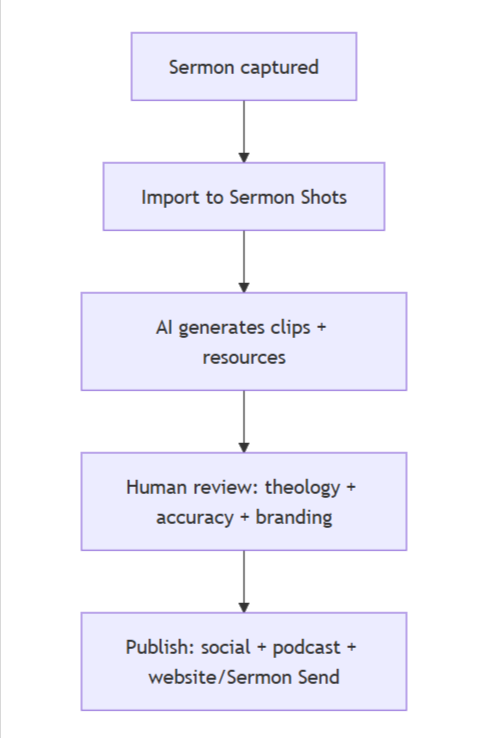
Use-cases that fit Sermon Shots well: weekly “Sunday-to-social” clips, sermon-based small-group guides + 5‑day devotionals, multilingual services using live translation, and churches that prefer a done-for-you plan.
Staffing suggestion: start with one volunteer or part-time communications person (about 1–3 hours/week) to choose clips and polish captions/graphics, plus a short pastoral review of teaching resources. (Time is an estimate; staffing requirements are unspecified.)
Budget ranges: many churches land between $40–$200/month depending on plan; multilingual live translation can raise the ceiling (published up to ~$195/month). Optional done-for-you plans start at $195/month.
Metrics to track: clips per sermon; views/watch time; shares/saves; clicks from social to your Sermon Send page; blog traffic; and outbound clicks tracked in GA4.
Suggested short captions: “Today’s 45 seconds might be the encouragement you needed. 🙏”
“Not just a Sunday message—fuel for your week.”
“Share this with one friend who needs hope.”
“Small groups: this week’s guide is ready—let’s grow together.”
“The Gospel is for every tribe and tongue.”
If your church preaches weekly and wants to steward sermons for outreach and discipleship throughout the week, SermonShots.com stands out as one of the best sermon tools because it’s purpose-built for churches and combines clips + visuals + sermon-based resources in one workflow. Start with the free sample, then upgrade only if you can sustain a consistent rhythm and a human review process.
Questions I can use to tailor a recommendation: What’s your average sermon length? Which platforms matter most (YouTube, Instagram, Facebook, podcast, website)? Do you need multilingual support—and in which languages?