Physical Address
304 North Cardinal St.
Dorchester Center, MA 02124
Physical Address
304 North Cardinal St.
Dorchester Center, MA 02124

A church pastor working on a computer, illustrating how church leaders use software tools to manage their ministry. Church leaders today often hear the terms Church CRM and Church Management Software (ChMS) used interchangeably – but they aren’t exactly the same thing. Both types of tools help ministries get organized and grow, yet their purposes and features differ in important ways. Understanding this distinction will help your ministry choose the right tool for outreach, discipleship, and operations. In this article, we’ll define what each term means, explore their core differences, and provide real-world examples (including a comparison of popular platforms like Planning Center, Breeze, ChMeetings, Church Community Builder, etc.). By the end, you’ll know which solution (or combination of solutions) might be the best fit for your church’s size and needs.
A Church CRM is a software system designed to help churches cultivate deeper, more personal relationships with people – much like a customer relationship management tool, but tailored for ministry. The focus of a church CRM is on engagement, follow-up, and communication with members, visitors, and volunteers. In practice, this means a church CRM often includes features such as:
In short, a church CRM’s primary goal is to help pastors, ministry leaders, and volunteers interact meaningfully with every person in the congregation. It’s all about people and relationships. A good CRM feels like a ministry assistant that ensures no one falls through the cracks in terms of follow-up, prayer, or care.
Who might use a Church CRM? Typically, pastors, assimilation teams, volunteer coordinators, or small church staff use CRM tools to manage outreach. For example, a small church plant might use a simple CRM to keep track of new visitor follow-ups and send group texts about upcoming Bible studies. The emphasis is on personal touch and communication, rather than heavy administration.
By contrast, Church Management Software (ChMS) is a more comprehensive system focused on the administrative and operational side of church life. Think of ChMS as the digital backbone that helps run the day-to-day business of the church. It typically includes features like:
In essence, a ChMS is the all-in-one “operations hub” that helps church staff manage data and automate routine tasks so nothing falls through the cracks administratively. It streamlines tasks like keeping records up to date, tracking donations, communicating announcements, and planning events so that leaders can focus more on ministry and less on paperwork.
Who uses Church Management Software? Church administrators, office staff, finance teams, and ministry department heads are the primary users. For example, a medium-sized church might use a ChMS to track weekly attendance, manage a volunteer rotation schedule, plan the calendar for various ministries, handle online giving records, and run reports for board meetings. It’s especially valuable for larger churches that have a lot of moving parts to coordinate.
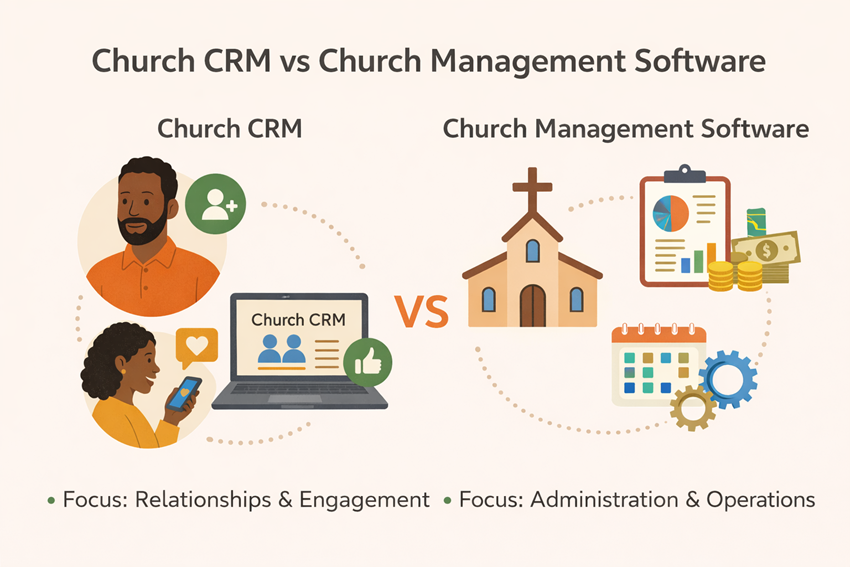
Both Church CRM and Church Management Software deal with people information, but they serve different core purposes. Here’s a quick comparison of their focus and features:
It’s worth noting that the line can blur – many modern church management suites include CRM-like communication features, and some church CRMs have expanded to include more management features. The distinction is mostly in emphasis: people engagement vs. process management.
When might you choose a Church CRM over a full ChMS? If your church’s top priorities are connection, follow-up, personal outreach, and simplicity, a CRM might serve you best. Some specific advantages of a Church CRM include:
However, a limitation of a standalone CRM is that it typically won’t handle your operational needs. If you need to track giving, schedule dozens of volunteers, or generate detailed attendance reports, a pure CRM will fall short. That’s where a ChMS shines.
When might you choose Church Management Software? If administration, tracking, finances, and coordination are your primary needs, a ChMS is likely the right choice. Key advantages of ChMS include:
On the flip side, the drawbacks of ChMS can include higher cost, a learning curve for staff who are not tech-savvy, and sometimes less flexibility or customization if the software is rigid. Some comprehensive systems can feel overwhelming for a small church that doesn’t need half the features. That’s why it’s crucial to match the tool to your context.
Can you use both together? Absolutely – in fact, many churches use a combination: perhaps a dedicated CRM tool for member engagement and a ChMS for everything else. For example, you might use a specialized texting/email follow-up tool to nurture new visitors (CRM) while using a management system to handle membership records and giving. Some products also integrate CRM and management features so you get the “best of both worlds” in one package. The key is that if you do use separate systems, look for integration options so that data (like people’s contact info or attendance) syncs between the CRM and ChMS. Integration ensures your engagement tool and management tool work in harmony – e.g., when someone new is added in the ChMS, they automatically get plugged into your follow-up workflow in the CRM.
Churches come in all sizes, and the needs of a 50-person church differ from a 5,000-person multi-campus ministry. Here are some real-world scenarios to illustrate how CRM vs ChMS needs might play out:
In summary, smaller churches lean toward simpler, cost-effective solutions that combine basic management with easy communication (a “CRM-ish ChMS,” if you will). Mid-sized churches often blend both – they need true management features and might integrate some CRM tools for engagement. Larger churches almost certainly require a full-fledged ChMS for the heavy lifting of administration, possibly supplemented by targeted engagement software for specific outreach efforts.
To make these concepts more concrete, let’s compare some well-known church software platforms and see where they stand. Below is a comparison table highlighting a few key aspects of popular solutions: Planning Center, Breeze, ChMeetings, and Church Community Builder, as well as additional notes on others where relevant. This will illustrate the differences in approach, features, and suitability:
| Platform | Approach & Strengths | Ideal For | Pricing Model | Notable Integrations & Scalability |
| Planning Center (Online) | Modular all-in-one Church Management Suite – offers separate apps for different functions (People, Services, Giving, Check-Ins, etc.). Known for powerful service planning and volunteer scheduling tools. Easy to use with many features, making it great for streamlining church processes. | Medium to large churches; churches that want flexibility to start small and add modules as they grow. Planning Center is well-liked by many because of its polish and “it just makes sense” design. | Modular pricing: Each module has its own tiered cost, and the price increases as you use more or have more members in that module. (There is a free tier for the People module with basic contact management.) This allows customization but can become costly for full functionality as a church grows. | Extensive integration capabilities via API and third-party add-ons. Planning Center has an ecosystem of integrations (for example, with worship presentation software, donation import tools, etc.) and a robust API. Scales well to multi-campus – you can set up multiple sites in the People module, and it handles large databases (used by some megachurches). |
| Breeze Church Management | All-in-one ChMS, focused on simplicity and essential features. It’s cloud-based, very easy to use, and often praised for an intuitive interface. Includes people database, attendance, events, contributions, basic volunteer management, and communication (email/text) tools. Noted for being affordable and geared toward smaller churches. | Small to mid-sized churches that want a simple but powerful solution without a steep learning curve. It’s great for churches with limited IT support – “it just works” out of the box. Even non-tech-savvy staff find it easy to navigate. | Flat-rate pricing: Breeze charges one flat monthly fee (around $72) that includes all features, unlimited people, and unlimited users. The price stays the same no matter how large the church gets, which provides cost predictability. (No surprise add-ons later – support and upgrades are included.) | Integrations: Breeze offers integrations such as with QuickBooks (accounting) and has import/export capabilities. It may not have as many direct integrations as some others, but it covers the basics and supports Zapier for connecting to other apps. Scalability: Technically Breeze can handle large databases, but its feature set is intentionally basic. Large churches might find it lacks some advanced reporting or customization that they need, whereas it hits the sweet spot for small-medium churches. |
| ChMeetings | Hybrid Church CRM & ChMS: An all-in-one platform that combines member management with engagement tools. ChMeetings provides a people database, group management, events, volunteer management, multi-channel communication (emails, SMS), and even online giving and attendance tracking. Emphasis on being easy-to-use and affordable, with frequent updates and a modern interface (developed by church tech leaders). Great multi-lingual and multi-campus support is built-in. | Churches of all sizes, but especially attractive to small and mid-sized churches globally that need a budget-friendly comprehensive tool. Its free tier and scalable plans make it accessible to a tiny church plant, yet it’s used by churches with several thousand members as well. Also good for churches needing multi-language support or operating in regions where cost is a big factor (ChMeetings has a global user base). | Freemium tiered pricing: You can start with a free plan (up to 50 people). Paid plans then scale based on the number of people in the database (with several tiers, e.g. up to 100, 250, 500, etc.), starting at a low cost (roughly $12/month for small sizes). This “pay as you grow” model lets a church only pay more when their attendance increases. All features are included even in lower tiers, just limits on people count. | Integrations: ChMeetings offers integrations (e.g., with Mailchimp for newsletters, Twilio for messaging, etc.) and has an API. Users note that while it has integration capabilities, it may be less flexible with third-party connections than some competitors – but it covers most needs in one system, reducing the need for many external tools. Scalability: Designed to handle multi-campus churches within one account. Data is hosted securely in the cloud. Because it’s newer on the market, it’s rapidly adding features; very large organizations should ensure it meets any specific advanced needs (users have noted it lacks some advanced report customizations that more mature systems like Breeze have). However, it scores high on ease of use and support (even a perfect support rating from some reviewers). |
| Church Community Builder (Pushpay) | Comprehensive Church Management System with a strong focus on connection and assimilation processes in addition to standard management features. CCB offers robust people management, volunteer scheduling, group management, event registration, online giving (through Pushpay integration), and excellent follow-up workflow tools for connecting people into ministry. It’s considered an advanced, enterprise-level ChMS for churches needing depth in reporting and process management. | Medium to large churches, especially those that are growing or multi-campus, that need a very comprehensive and customizable system. CCB is often favored by churches that want not just data storage but guided processes (e.g., moving a newcomer through steps to become a member). It’s powerful but can be complex, so it fits churches that have the staff and resources to utilize its features fully (including possibly an IT or database manager on the team). | Tiered/Subscription pricing: Church Community Builder (now under Pushpay) typically prices based on church size (attendance) and modules. It usually requires contacting their sales for a quote. Costs increase with the size of your church and the breadth of functionality needed. Larger churches pay more, and there may be additional costs for add-on services (e.g., coaching, data migration, or premium support). It’s generally on the higher end of pricing, reflecting its enterprise features. | Integrations: CCB has an API and integrates especially well with Pushpay for giving, as well as other systems through its developer network. It can integrate with check-in systems, form builders, etc. However, some users find that certain custom integrations or export tasks can require more technical work. Scalability: Specifically built for large-scale use – handles large databases and allows extensive user permission controls, multiple campuses, and segmented reporting. It does require more training to use effectively, but for a big church, the payoff is a unified, deeply capable system managing all facets of ministry data. |
Other notable platforms: In addition to the above, there are other systems worth mentioning. FellowshipOne is another enterprise all-in-one ChMS similar in scope to CCB, aimed at churches needing a comprehensive, scalable solution for expanding memberships. ChurchTrac is a budget-friendly church software often chosen by small churches (it has a very low monthly cost and includes basic CRM and management features), though it may not be as polished. Rock RMS deserves a mention for large churches with IT resources – it’s an open-source ChMS that is highly customizable and powerful, used by some megachurches; however, it requires self-hosting and technical expertise to implement. On the simpler end, tools like Text In Church or Fluro are examples of church CRM-focused apps (centered on communication and follow-up) that some churches use alongside a lighter database or even spreadsheets. The landscape is rich, so churches can find a tool tailored to their size and needs.
Beyond features and cost, it’s important to understand some technical differences in how these systems operate under the hood:
In summary, from a technical standpoint, most churches will opt for a cloud-based ChMS/CRM that the vendor maintains. Just keep an eye on how well it plays with other tools and how it will scale with your ministry. And always retain the ability to get your data out if needed – it’s your ministry data, after all.
Selecting the right tool between a Church CRM and Church Management Software comes down to understanding your church’s priorities and capacities. If you’re primarily looking to enhance personal connections – making sure every visitor is followed up with and every member feels known – then a Church CRM might be the perfect starting point. These tools shine in helping ministry feel personal and preventing people from “slipping through the cracks”. On the other hand, if your church is juggling a lot of programs, volunteers, and data, a robust Church Management Software provides the administrative backbone to keep things running smoothly. They cut down the busywork and help you steward information responsibly, which ultimately supports the ministry work.
For many churches, it’s not an either/or but a both/and: you might start with one and add the other. As one church communications blog put it, “Connection without administration or vice versa can limit growth potential” – in other words, relationships and operations are both critical for a healthy, growing church. Don’t be afraid to use a combination of tools if needed (just ensure they integrate or that you have a clear process to use them together).
Lastly, remember that the “best” software is the one that you will actually use effectively. A simple system that your team embraces will serve you better than an advanced one that no one logs into. Consider doing demos or free trials of a few options with your team. Many providers offer trial periods or even free versions – for instance, you can try out the full features of some platforms for 30 days or start free on a limited plan. Take advantage of those to see what feels right. And consider the support available: vendors like Breeze include support in their flat fee, and ChMeetings users have rated its support highly – having help when you need it makes a big difference, especially if you’re not tech-savvy.
In the end, Church CRM vs Church Management Software isn’t a battle but a spectrum of solutions. Define your church’s needs (people engagement, administrative tasks, or both), evaluate the options with those needs in mind, and you’ll be well on your way to a tool that helps your ministry flourish. Here’s to finding a software solution that frees you up to do what you’re called to do – loving God and people – while it handles the nuts and bolts in the background! 😊